


For the past 8 years I have helped IT leaders understand the total cost of ownership for Dynamics 365. I’ve been using Excel, but that is old fashioned now. I’ve felt like this information and data has not been easily obtained, although it could be ascertained. So I’ve made a tool to make it much easier to understand!! I built a tool where that question always has an answer, and I’m releasing it free today!!
What it is
One HTML file. Download estimator.html from GitHub, open it in your browser, and you’re running. No server and no install! Your work autosaves in the browser and saves out as a JSON file, and every estimate file you ever export will open in every future version.
It estimates the Microsoft cloud and licensing run-rate of a Dynamics 365 Finance & Supply Chain Management implementation for up to 60 months:
- Environments, scheduled by ‘methodology rules’ and overridable
- Storage entitlements and monthly overage
- Copilot Studio credits and packs
- Azure DevOps seats and pipelines
- Your own custom items: ISVs, Microsoft Fabric capacity, anything with a price
- The timeline follows Microsoft’s Success by Design phases: Initiate, Implement, Prepare, Operate. Phased deployments get multiple rollouts, each with its own go-live.
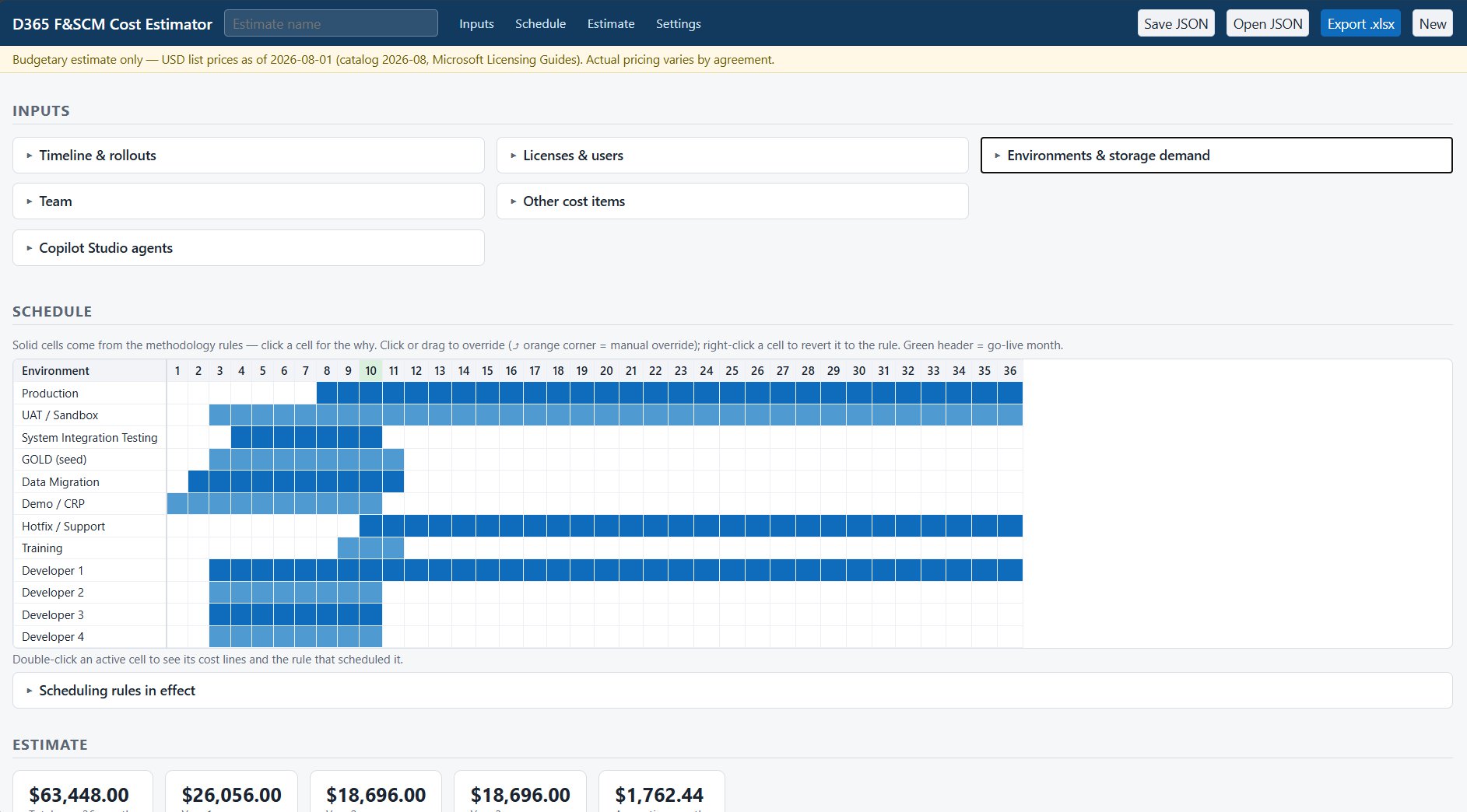
You can customize this tool to work however you like through the incredible configuration.
Scheduling rules decide when each environment runs, based on how real projects are delivered. One DEV box per developer, with the lead developer’s box kept for the life of the system. A dedicated data-migration environment starting a month before build, so a corrupted test run can’t hurt the wider project. A hotfix environment after go-live. Disagree with any of it? Override any cell in the environment-by-month grid. Overrides are flagged and reversible.
Storage is where I see the most estimates go wrong. The tool computes entitled capacity (tenant base plus per-license accruals) against the demand of whichever environments are active that month, per pool, and bills the overage at add-on prices. Monthly, the way Microsoft actually bills it.
Every dollar is visible
Click any figure and you get the cost lines behind it: the formula in words, the rule that scheduled it, and a citation to the section of the Microsoft Licensing Guide the price came from, with its as-of date. The Excel export carries the same citations on its Assumptions sheet.
However, this is a budgetary estimate, not a quote. Prices are USD list, cited as of a stated date. Your actual pricing depends on your agreement… EA versus CSP, discounts, region, actual usage. And this is a personal project, not a Microsoft published document.
I recorded a full walkthrough on YouTube.
The code is MIT-licensed on GitHub. Issues and pull requests welcome. If you have ideas, let me know!
If I were you, I’d load your current project into it and compare the storage line against what you budgeted. That line is where the surprises live.
What does your team use today to estimate the ongoing Microsoft bill: a spreadsheet, a partner’s number, or a guess?





[…] By Dag Calafell, III|2026-08-22T22:35:17-06:00August 23, 2026|Dynamics 365 Finance, Supply Chain Mgmt (AX 7, 8, 10, Operations)|0 Comments […]